Minggu, 23 September 2018

PBO A- remote AC

Pada kesempatan kali ini saya berkesampatan membuat system remote AC menggunakan Bahasa Java. Berikut saya lampirkan source cadenza :

1. Remote

  public class RemoteAC   
  {   
   public boolean power;   
   public int temp;   
   public int mode;   
   public int swing;   
   public RemoteAC(int tempnow)   
   {   
    power =true;   
    temp =tempnow;   
    mode =1;   
    swing =1;    
   }   
   public void modeAC(int modesekarang)   
   {   
    if(mode==1)   
    {   
     System.out.println("Mode sekarang : Otomatis");   
    }   
    else if(mode==2)   
    {   
     System.out.println("Mode sekarang : Cool");   
    }   
    else if(mode==3)   
    {   
     System.out.println("Mode sekarang : Dry");   
    }   
    else if(mode==4)   
    {   
     System.out.println("Mode sekarang : Fan");   
    }   
   }   
   public void Mode(int modesekarang)   
   {   
    modeAC(modesekarang);   
    System.out.println("Pilih mode yang anda inginkan :");   
    System.out.println("1. Otomatis");   
    System.out.println("2. Cool");   
    System.out.println("3. Dry ");   
    System.out.println("4. Fan");   
   }   
   public int ModeIngin(int modepilihan)   
   {   
    if(modepilihan ==1)   
    {   
     mode= modepilihan;   
     System.out.println("Mode yang anda inginkan berhasil! Mode sekarang : Otomatis ");   
    }   
    else if(modepilihan ==2)   
    {   
     mode= modepilihan;   
     System.out.println("Mode yang anda inginkan berhasil! Mode sekarang : Cool ");   
    }   
    else if(modepilihan ==3)   
    {   
     mode= modepilihan;   
     System.out.println("Mode yang anda inginkan berhasil! Mode sekarang : Dry ");   
    }   
    else if(modepilihan ==4)   
    {   
     mode= modepilihan;   
     System.out.println("Mode yang anda inginkan berhasil! Mode sekarang : Fan ");   
    }   
    return(mode);   
   }   
   public void tempratur(int tempsekarang)    
   {    
    System.out.println("Tempratur Sekarang :"+tempsekarang);    
    System.out.println("1. Naik");    
    System.out.println("2. Turun");    
   }    
   public int tempraturNaik(int naik)    
   {    
    if(naik>=30)    
    {   
    }    
    else    
    {    
     naik++;    
    }    
    return(naik);    
   }    
   public int tempraturTurun(int turun)    
   {    
    if(turun<=16)    
    {    
    }    
    else    
    {     
     turun--;    
    }    
    return(turun);    
   }    
  }   

2. Main

  import java.util.Scanner;   
  public class main   
  {   
   public static void main(String args[])   
   {   
    System.out.print('\u000C');   
    System.out.println("Atur tempratur yang anda inginkan:");   
    Scanner scan= new Scanner(System.in);   
    int tempawal;   
    int tempvalue;   
    int modevalue;   
    int menu;   
    boolean cek;   
    int sementara, smntr,modeAC,smntr1;   
    tempawal=scan.nextInt();   
    if(tempawal>=16 && tempawal<=30)   
    {   
     RemoteAC remAC= new RemoteAC(tempawal);   
     modeAC= remAC.mode;   
     while(true)   
     {   
      System.out.print('\u000C');    
      System.out.println("Haier AC");    
      System.out.println("Tempratur : "+tempawal);    
      remAC.modeAC(modeAC);    
      System.out.println("Menu");    
      System.out.println("1. Ubah Tempratur");    
      System.out.println("2. Ubah Mode");    
      System.out.println("3. Matikan AC");    
      System.out.println("------------------------------");    
      menu = scan.nextInt();    
      System.out.print('\u000C');    
      if(menu==1)    
      {    
       System.out.println("AC");   
       System.out.println("Tempratur : "+tempawal);    
       remAC.modeAC(modeAC);   
       remAC.tempratur(tempawal);    
       System.out.println("------------------------------------");    
       tempvalue = scan.nextInt();    
       if(tempvalue==1)    
       {    
        sementara = remAC.tempraturNaik(tempawal);    
        tempawal = sementara;    
       }    
       else if(tempvalue==2)    
       {    
        sementara = remAC.tempraturTurun(tempawal);    
        tempawal = sementara;    
       }    
       System.out.print('\u000C');    
      }    
      else if(menu==2)    
      {   
       System.out.println("Haier AC");    
       System.out.println("Tempratur : "+tempawal);    
       remAC.modeAC(modeAC);    
       remAC.Mode(modeAC);    
       modevalue = scan.nextInt();    
       smntr=remAC.ModeIngin(modevalue);    
       modeAC = smntr;    
       System.out.print('\u000C');    
      }    
      else if(menu==4)    
      {    
       System.out.print('\u000C');    
       break;    
      }       
      }   
    }   
    else    
    {    
     System.out.println("Temperatur AC hanya bisa dari 16-30");    
    }    
   }    
  }  

Berikut saya lampirkan pula hasil compile:
1. Halaman awal kita menentukan suhu

2. Halaman selanjutnya menampilkan menu apa saja yang dapat kita pilih


Rabu, 19 September 2018

PWEB C CSS

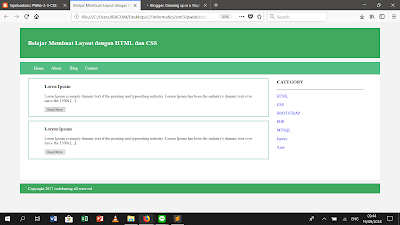
pada hari ini saya mendapat tugas membuat layout dengan bahasa css. berikut saya lampirkan source codenya :
1. HTML

<pre style="font-family: Andale Mono, Lucida Console, Monaco, fixed, monospace; color: #000000; background-color: #eee;font-size: 12px;border: 1px dashed #999999;line-height: 14px;padding: 5px; overflow: auto; width: 100%"><code>&lt;!DOCTYPE html&gt; 
 &lt;html&gt; 
 &lt;head&gt; 
      &lt;title&gt;Belajar Membuat Layout dengan HTML dan CSS&lt;/title&gt; 
      &lt;link rel=&quot;stylesheet&quot; type=&quot;text/css&quot; href=&quot;custom.css&quot;&gt; 
 &lt;/head&gt; 
 &lt;body&gt; 
      &lt;div class=&quot;header&quot;&gt; 
           &lt;div class=&quot;jarak&quot;&gt; 
                &lt;h2&gt;Belajar Membuat Layout dengan HTML dan CSS&lt;/h2&gt; 
           &lt;/div&gt; 
      &lt;/div&gt; 
      &lt;div class=&quot;menu&quot;&gt; 
           &lt;ul&gt; 
                &lt;li&gt;&lt;a href=&quot;#&quot;&gt;Home&lt;a&gt;&lt;/li&gt; 
                &lt;li&gt;&lt;a href=&quot;#&quot;&gt;About&lt;/a&gt;&lt;/li&gt; 
                &lt;li&gt;&lt;a href=&quot;#&quot;&gt;Blog&lt;/a&gt;&lt;/li&gt; 
                &lt;li&gt;&lt;a href=&quot;#&quot;&gt;Contact&lt;/a&gt;&lt;/li&gt; 
           &lt;/ul&gt; 
      &lt;/div&gt; 
      &lt;div class=&quot;content&quot;&gt; 
           &lt;div class=&quot;jarak&quot;&gt; 
                &lt;!-- kiri --&gt; 
                &lt;div class=&quot;kiri&quot;&gt; 
                     &lt;!-- blog --&gt; 
                     &lt;div class=&quot;border&quot;&gt; 
                          &lt;div class=&quot;jarak&quot;&gt; 
                               &lt;h3&gt;Loren Ipsum&lt;/h3&gt; 
                               &lt;p&gt;Loren Ipsum is simply dummy text if the printing and typesetting industry. Lorem Ipsum has been the industry's dummy text ever since the 1500s [...]&lt;/p&gt; 
                               &lt;button class=&quot;btn&quot;&gt;Read More&lt;/button&gt; 
                          &lt;/div&gt; 
                     &lt;/div&gt; 
                &lt;!-- end blog --&gt; 
                &lt;!-- blog --&gt; 
                &lt;div class=&quot;border&quot;&gt; 
                     &lt;div class=&quot;jarak&quot;&gt; 
                          &lt;h3&gt;Lorem Ipsum&lt;/h3&gt; 
                          &lt;p&gt;Loren Ipsum is simply dummy text if the printing and typesetting industry. Lorem Ipsum has been the industry's dummy text ever since the 1500s [...]&lt;/p&gt; 
                          &lt;button class=&quot;btn&quot;&gt;Read More&lt;/button&gt; 
                     &lt;/div&gt; 
                &lt;/div&gt; 
                &lt;!-- end blog --&gt; 
                &lt;/div&gt; 
           &lt;!-- kiri --&gt; 
           &lt;!-- kanan --&gt; 
           &lt;div class=&quot;kanan&quot;&gt; 
                &lt;div class=&quot;jarak&quot;&gt; 
                     &lt;h3&gt;CATEGORY&lt;/h3&gt; 
                     &lt;hr/&gt; 
                     &lt;p&gt;&lt;a href=&quot;#&quot; class=&quot;undercor&quot;&gt;HTML&lt;/a&gt;&lt;/p&gt; 
                     &lt;p&gt;&lt;a href=&quot;#&quot; class=&quot;undercor&quot;&gt;CSS&lt;/a&gt;&lt;/p&gt; 
                     &lt;p&gt;&lt;a href=&quot;#&quot; class=&quot;undercor&quot;&gt;BOOTSTRAP&lt;/a&gt;&lt;/p&gt; 
                     &lt;p&gt;&lt;a href=&quot;#&quot; class=&quot;undercor&quot;&gt;PHP&lt;/a&gt;&lt;/p&gt; 
                     &lt;p&gt;&lt;a href=&quot;#&quot; class=&quot;undercor&quot;&gt;MYSQL&lt;/a&gt;&lt;/p&gt; 
                     &lt;p&gt;&lt;a href=&quot;#&quot; class=&quot;undercor&quot;&gt;Jquery&lt;/a&gt;&lt;/p&gt; 
                     &lt;p&gt;&lt;a href=&quot;#&quot; class=&quot;undercor&quot;&gt;Ajax&lt;/a&gt;&lt;/p&gt; 
                &lt;/div&gt; 
           &lt;/div&gt; 
           &lt;!-- kanan --&gt; 
           &lt;/div&gt; 
      &lt;/div&gt; 
      &lt;div class=&quot;footer&quot;&gt; 
           &lt;div class=&quot;jarak&quot;&gt; 
                &lt;p&gt;Copyright 2017 codebareng all reserved&lt;/p&gt; 
           &lt;/div&gt; 
      &lt;/div&gt; 
 &lt;/body&gt; 
 &lt;/html&gt; 
</code></pre>

2. CSS
<pre style="font-family: Andale Mono, Lucida Console, Monaco, fixed, monospace; color: #000000; background-color: #eee;font-size: 12px;border: 1px dashed #999999;line-height: 14px;padding: 5px; overflow: auto; width: 100%"><code> body{ 
      background: #f3f3f3; 
      color: #333; 
      width: 100%; 
      font-family: sans-sherif; 
      margin: 0 auto; 
 } 
 .header{ 
      width: 90%; 
      margin: auto; 
      height: 120px; 
      line-height: 120px; 
      background: #41A85F; 
      color: #fff; 
 } 
 .content{ 
      width: 90%; 
      margin: auto; 
      height: 420px; 
      padding: 0.1px; 
      background: #fff; 
      color: #333; 
 } 
 .kiri{ 
      width: 70%; 
      float: left; 
      margin: auto; 
      background: #fff; 
      height: 420px; 
 } 
 .kanan{ 
      width: 30%; 
      float: left; 
      margin: auto; 
      background: #fff; 
      height: 420px; 
 } 
 .border{ 
      border: 2px solid #74C599; 
      margin-top: 1pc; 
      padding-bottom: 1pc; 
      padding-left: 2pc; 
      padding-right: 2pc; 
 } 
 .undercor{ 
      text-decoration: none; 
 } 
 .footer{ 
      width: 90%; 
      margin: auto; 
      height: 40px; 
      line-height: 40px; 
      background: #41A85F; 
      color: #fff; 
 } 
 .menu{ 
      background-color: #53BD84; 
      height: 50px; 
      line-height: 50px; 
      position: relative; 
      width: 90%; 
      margin: 0 auto; 
      padding: 0 auto; 
 } 
 .jarak{ 
      padding: 0 2pc; 
 } 
 .menu ul{ 
      list-style: none; 
 } 
 .menu ul li a{ 
      float: left; 
      width: 70px; 
      display: block; 
      text-align: center; 
      color: #fff; 
      text-decoration: none; 
 } 
 .menu ul li a:hover{ 
      background-color: #74C599; 
      display: block; 
 } 
</code></pre>

berikut saya lampirkan pula hasil compilenya:


Senin, 17 September 2018

PBO A- Tiket Machine

Pada Kesempatan kali ini saya diberi tugas membuat sistem mesin tiket dengan bahasa Java.

Berikkut saya lampirkan hasil compile dari kodingan saya:

Berikut saya lampirkan pula Source codenya :
1. Main

<pre style="font-family: Andale Mono, Lucida Console, Monaco, fixed, monospace; color: #000000; background-color: #eee;font-size: 12px;border: 1px dashed #999999;line-height: 14px;padding: 5px; overflow: auto; width: 100%"><code> import java.util.Scanner;   
 public class IntMain   
 {   
  public static void main()   
  {   
    Scanner scan= new Scanner(System.in);   
    int cost,menu=0;   
    System.out.println(&quot;Input the ticket's price&quot;);   
    cost=scan.nextInt();   
    TicketMachine ticket=new TicketMachine(cost);  
    System.out.println(&quot;\n&quot;);  
    while(menu &lt; 5)  
    {  
      System.out.println(&quot;==================================&quot;);  
      System.out.println(&quot;Classical Clarion Online Tickets Menu: &quot;);  
      System.out.println();  
      System.out.println(&quot;1. Ticket Price&quot;);   
      System.out.println(&quot;2. Your Balance&quot;);   
      System.out.println(&quot;3. Insert Money&quot;);   
      System.out.println(&quot;4. Buy and Print Ticket (Refund Included)&quot;);   
      System.out.println(&quot;5. Exit&quot;);  
      System.out.println(&quot;==================================&quot;);  
      System.out.println(&quot;Selected Menu: &quot;);  
      menu=scan.nextInt();   
      switch(menu)   
      {    
        case 1:   
        cost=ticket.getPrice();  
        System.out.println(&quot;Classical Clarion Ticket Price: &quot;);  
        System.out.println(&quot;Rp. &quot; + cost);   
        break;   
        case 2:   
        System.out.println(&quot;Your Balance: &quot;);  
        System.out.println(&quot;Rp. &quot; + ticket.getBalance());  
        break;   
        case 3:   
        System.out.println(&quot;Top up amount: &quot;);  
        int money=scan.nextInt();  
        ticket.insertMoney(money);   
        break;   
        case 4:   
        ticket.printTicket();   
        System.out.println(&quot;You successfully bought the ticket(s)! We will be waiting for you at Classical Clarion!\n&quot;);  
        break;  
      }  
    }  
  }   
  }   
</code></pre>

2. Mesin

<pre style="font-family: Andale Mono, Lucida Console, Monaco, fixed, monospace; color: #000000; background-color: #eee;font-size: 12px;border: 1px dashed #999999;line-height: 14px;padding: 5px; overflow: auto; width: 100%"><code>  public class TicketMachine   
  {   
  private int price;   
  private int balance;   
  private int total;   
  private int tickets;  
  private int refund;  
  public TicketMachine(int ticketCost)   
  {   
  price = ticketCost;   
  balance = 0;   
  total = 0;  
  tickets = 0;  
  refund = 0;  
  }   
  public int getPrice()   
  {   
  return price;   
  }   
  public int getBalance()   
  {   
   return balance;   
  }   
  public void insertMoney(int amount)   
  {   
   if(amount &gt; 0)  
   {  
     balance = balance + amount;  
   }  
   else  
   {  
     System.out.println(&quot;Please insert a sensible amount of money.&quot;);  
   }  
  }   
  public void printTicket()   
  {   
   if(balance &gt; 0)  
   {  
     if(balance &gt;= price)  
     {  
       tickets = purchaseTickets();  
       int i = 1;  
       while(i &lt;= tickets)  
       {  
         System.out.println(&quot;##############################&quot;);   
         System.out.println(&quot;# Classical Clarion Tickets&quot;);   
         System.out.println(&quot;# Ticket #CC&quot; + i);   
         System.out.println(&quot;# Price: Rp. &quot; + price);  
         System.out.println(&quot;#&quot;);  
         System.out.println(&quot;# Open Space Grand City @3pm&quot;);  
         System.out.println(&quot;# 25 September 2018&quot;);  
         System.out.println(&quot;##############################&quot;);   
         System.out.println();  
         i++;  
       }  
       total = total + balance;   
       refund = refundBalance();  
       if (refund == 0)  
       {  
         System.out.println(&quot;No change given.&quot;);  
       }  
       else  
       {  
         System.out.println(&quot;Amount to refund: Rp. &quot; + refund);  
       }  
       balance = 0;  
     }  
     else  
     {  
       System.out.println(&quot;Please insert Rp. &quot; + (price - balance) + &quot; more.&quot;);  
     }  
   }  
   else  
   {  
     System.out.println(&quot;Please insert a positive amount of money.&quot;);  
   }  
  }  
  public int refundBalance()  
  {  
    int amountToRefund;  
    amountToRefund = balance - price * tickets;  
    balance = 0;  
    return amountToRefund;  
  }  
  public int purchaseTickets()  
  {  
    int numberOfTickets;  
    numberOfTickets = balance / price;  
    return numberOfTickets;  
  }  
 }  
</code></pre>


PBO A - Menggambar Pemandangan

Pada kesempatan kali ini saya berkesempatan membuat lukisa pemandangan melalui pemrograman berbasis java. berikut adalah hasil dari compile codingan saya:
dan berikut adalah source codenya:

1. Canvas
<pre style="font-family: Andale Mono, Lucida Console, Monaco, fixed, monospace; color: #000000; background-color: #eee;font-size: 12px;border: 1px dashed #999999;line-height: 14px;padding: 5px; overflow: auto; width: 100%"><code>import javax.swing.*; 
  import java.awt.*; 
  import java.util.List; 
  import java.util.*; 
  public class Canvas 
  { 
   private static Canvas canvasSingleton;
   public static Canvas getCanvas() 
   { 
    if(canvasSingleton == null) { 
     canvasSingleton = new Canvas(&quot;BlueJ Shapes Demo&quot;, 1000, 800, Color.white); 
    } 
    canvasSingleton.setVisible(true); 
    return canvasSingleton; 
   } 
   private JFrame frame; 
   private CanvasPane canvas; 
   private Graphics2D graphic; 
   private Color backgroundColour; 
   private Image canvasImage; 
   private List objects; 
   private HashMap shapes; 
   private Canvas(String title, int width, int height, Color bgColour) 
   { 
    frame = new JFrame(); 
    canvas = new CanvasPane(); 
    frame.setContentPane(canvas); 
    frame.setTitle(title); 
    canvas.setPreferredSize(new Dimension(width, height)); 
    backgroundColour = bgColour; 
    frame.pack(); 
    objects = new ArrayList(); 
    shapes = new HashMap(); 
   } 
   public void setVisible(boolean visible) 
   { 
    if(graphic == null) {     
     Dimension size = canvas.getSize(); 
     canvasImage = canvas.createImage(size.width, size.height); 
     graphic = (Graphics2D)canvasImage.getGraphics(); 
     graphic.setColor(backgroundColour); 
     graphic.fillRect(0, 0, size.width, size.height); 
     graphic.setColor(Color.black); 
    } 
    frame.setVisible(visible); 
   }     
   public void draw(Object referenceObject, String color, Shape shape) 
   { 
    objects.remove(referenceObject); 
    objects.add(referenceObject); 
    shapes.put(referenceObject, new ShapeDescription(shape, color)); 
    redraw(); 
   } 
   public void erase(Object referenceObject) 
   { 
    objects.remove(referenceObject);
    shapes.remove(referenceObject); 
    redraw(); 
   }   
   public void setForegroundColor(String colorString) 
   { 
    if(colorString.equals(&quot;red&quot;)) 
     graphic.setColor(Color.red); 
    else if(colorString.equals(&quot;black&quot;)) 
     graphic.setColor(Color.black); 
    else if(colorString.equals(&quot;blue&quot;)) 
     graphic.setColor(Color.blue); 
    else if(colorString.equals(&quot;yellow&quot;)) 
     graphic.setColor(Color.yellow); 
    else if(colorString.equals(&quot;green&quot;)) 
     graphic.setColor(Color.green); 
    else if(colorString.equals(&quot;magenta&quot;)) 
     graphic.setColor(Color.magenta); 
    else if(colorString.equals(&quot;white&quot;)) 
     graphic.setColor(Color.white); 
    else if(colorString.equals(&quot;light brown&quot;)) 
     graphic.setColor(new Color(153,102,0)); 
    else if(colorString.equals(&quot;brown&quot;)) 
     graphic.setColor(new Color(102,51,0)); 
    else if(colorString.equals(&quot;grey&quot;)) 
     graphic.setColor(new Color(190,190,190)); 
    else if(colorString.equals(&quot;light blue&quot;)) 
     graphic.setColor(new Color(0,191,255)); 
    else 
     graphic.setColor(Color.black); 
   }   
   public void wait(int milliseconds) 
   { 
    try 
    { 
     Thread.sleep(milliseconds); 
    }   
    catch (Exception e) 
    {   
    } 
   } 
   private void redraw() 
   { 
    erase(); 
    for(Iterator i=objects.iterator(); i.hasNext(); ) { 
     ((ShapeDescription)shapes.get(i.next())).draw(graphic); 
    } 
    canvas.repaint(); 
   }   
   private void erase() 
   { 
    Color original = graphic.getColor(); 
    graphic.setColor(backgroundColour); 
    Dimension size = canvas.getSize(); 
    graphic.fill(new Rectangle(0, 0, size.width, size.height)); 
    graphic.setColor(original); 
   }   
   private class CanvasPane extends JPanel 
   { 
    public void paint(Graphics g) 
    { 
     g.drawImage(canvasImage, 0, 0, null); 
    } 
   }   
   private class ShapeDescription 
   { 
    private Shape shape; 
    private String colorString; 
    public ShapeDescription(Shape shape, String color) 
    { 
     this.shape = shape; 
     colorString = color; 
    } 
    public void draw(Graphics2D graphic) 
    { 
     setForegroundColor(colorString); 
     graphic.fill(shape); 
    } 
   } 
  } 

</code></pre>

2. Triangle
<pre style="font-family: Andale Mono, Lucida Console, Monaco, fixed, monospace; color: #000000; background-color: #eee;font-size: 12px;border: 1px dashed #999999;line-height: 14px;padding: 5px; overflow: auto; width: 100%"><code>import java.awt.*;     
  public class Triangle 
  { 
   private int height; 
   private int width; 
   private int xPosition; 
   private int yPosition; 
   private String color; 
   private boolean isVisible; 
   public Triangle() 
   { 
    height = 30; 
    width = 40; 
    xPosition = 50; 
    yPosition = 15; 
    color = &quot;green&quot;; 
    isVisible = false; 
   } 
   public void makeVisible() 
   { 
    isVisible = true; 
    draw(); 
   }   
   public void makeInvisible() 
   { 
    erase(); 
    isVisible = false; 
   }   
   public void moveRight() 
   { 
    moveHorizontal(20); 
   }   
   public void moveLeft() 
   { 
    moveHorizontal(-20); 
   } 
   public void moveUp() 
   { 
    moveVertical(-20); 
   }   
   public void moveDown() 
   { 
    moveVertical(20); 
   }   
   public void moveHorizontal(int distance) 
   { 
    erase(); 
    xPosition += distance; 
    draw(); 
   }   
   public void moveVertical(int distance) 
   { 
    erase(); 
    yPosition += distance; 
    draw(); 
   }   
   public void slowMoveHorizontal(int distance) 
   { 
    int delta; 
    if(distance &lt; 0)   
    { 
     delta = -1; 
     distance = -distance; 
    } 
    else   
    { 
     delta = 1; 
    } 
    for(int i = 0; i &lt; distance; i++) 
    { 
     xPosition += delta; 
     draw(); 
    } 
   }   
   public void slowMoveVertical(int distance) 
   { 
    int delta; 
    if(distance &lt; 0)   
    { 
     delta = -1; 
     distance = -distance; 
    } 
    else   
    { 
     delta = 1; 
    } 
    for(int i = 0; i &lt; distance; i++) 
    { 
     yPosition += delta; 
     draw(); 
    } 
   }   
   public void changeSize(int newHeight, int newWidth) 
   { 
    erase(); 
    height = newHeight; 
    width = newWidth; 
    draw(); 
   }   
   public void changeColor(String newColor) 
   { 
    color = newColor; 
    draw(); 
   }   
   private void draw() 
   { 
    if(isVisible) { 
     Canvas canvas = Canvas.getCanvas(); 
     int[] xpoints = { xPosition, xPosition + (width/2), xPosition - (width/2) }; 
     int[] ypoints = { yPosition, yPosition + height, yPosition + height }; 
     canvas.draw(this, color, new Polygon(xpoints, ypoints, 3)); 
     canvas.wait(10); 
    } 
   }   
   private void erase() 
   { 
    if(isVisible) { 
     Canvas canvas = Canvas.getCanvas(); 
     canvas.erase(this); 
    } 
   } 
  } 
</code></pre>

3.Circle

<pre style="font-family: Andale Mono, Lucida Console, Monaco, fixed, monospace; color: #000000; background-color: #eee;font-size: 12px;border: 1px dashed #999999;line-height: 14px;padding: 5px; overflow: auto; width: 100%"><code>import java.awt.*;
  public class Circle 
  { 
   private int diameter; 
    private int xPosition; 
    private int yPosition; 
    private String color; 
    private boolean isVisible;
   public Circle() 
   { 
       diameter = 30; 
       xPosition = 20; 
       yPosition = 60; 
       color = &quot;blue&quot;; 
       isVisible = false; 
   } 
    public void makeVisible() 
    { 
       isVisible = true; 
       draw(); 
    }   
    public void makeInvisible() 
    { 
       erase(); 
       isVisible = false; 
    } 
   public void moveRight() 
   { 
       moveHorizontal(20); 
   }   
   public void moveLeft() 
   { 
       moveHorizontal(-20); 
   }   
   public void moveUp() 
   { 
       moveVertical(-20); 
   }   
   public void moveDown() 
   { 
       moveVertical(20); 
   }   
   public void moveHorizontal(int distance) 
   { 
       erase(); 
       xPosition += distance; 
       draw(); 
   }   
   public void moveVertical(int distance) 
   { 
       erase(); 
       yPosition += distance; 
       draw(); 
   }   
   public void slowMoveHorizontal(int distance) 
   { 
       int delta; 
       if(distance &lt; 0)   
       { 
         delta = -1; 
         distance = -distance; 
       } 
       else   
       { 
         delta = 1; 
       } 
       for(int i = 0; i &lt; distance; i++) 
       { 
         xPosition += delta; 
         draw(); 
       } 
   }   
   public void slowMoveVertical(int distance) 
   { 
       int delta; 
       if(distance &lt; 0)   
       { 
         delta = -1; 
         distance = -distance; 
       } 
       else   
       { 
         delta = 1; 
       } 
       for(int i = 0; i &lt; distance; i++) 
       { 
         yPosition += delta; 
         draw(); 
       } 
   }   
   public void changeSize(int newDiameter) 
   { 
       erase(); 
       diameter = newDiameter; 
       draw(); 
   }   
   public void changeColor(String newColor) 
   { 
       color = newColor; 
       draw(); 
   }     
    private void draw() 
    { 
       if(isVisible) { 
         Canvas canvas = Canvas.getCanvas(); 
         canvas.draw(this, color, new Ellipse2D.Double(xPosition, yPosition, diameter, diameter)); 
         canvas.wait(10); 
       } 
    }   
    private void erase() 
    { 
       if(isVisible) { 
         Canvas canvas = Canvas.getCanvas(); 
         canvas.erase(this); 
       } 
    } 
  } 
</code></pre>

4. Box

<pre style="font-family: Andale Mono, Lucida Console, Monaco, fixed, monospace; color: #000000; background-color: #eee;font-size: 12px;border: 1px dashed #999999;line-height: 14px;padding: 5px; overflow: auto; width: 100%"><code>import java.awt.*; 
  public class Box 
  { 
   private int width; 
   private int height; 
   private int xPosition; 
   private int yPosition; 
   private String color; 
   private boolean isVisible;
   public Box() 
   { 
    width = 30; 
    height = 30; 
    xPosition = 60; 
    yPosition = 50; 
    color = &quot;red&quot;; 
    isVisible = false; 
   } 
   public void makeVisible() 
   { 
    isVisible = true; 
    draw(); 
   }   
   public void makeInvisible() 
   { 
    erase(); 
    isVisible = false; 
   }   
   public void moveRight() 
   { 
    moveHorizontal(20); 
   }   
   public void moveLeft() 
   { 
    moveHorizontal(-20); 
   }   
   public void moveUp() 
   { 
    moveVertical(-20); 
   }   
   public void moveDown() 
   { 
    moveVertical(20); 
   }   
   public void moveHorizontal(int distance) 
   { 
    erase(); 
    xPosition += distance; 
    draw(); 
   }   
   public void moveVertical(int distance) 
   { 
    erase(); 
    yPosition += distance; 
    draw(); 
   }   
   public void slowMoveHorizontal(int distance) 
   { 
    int delta; 
    if(distance &lt; 0)   
    { 
     delta = -1; 
     distance = -distance; 
    } 
    else   
    { 
     delta = 1; 
    } 
    for(int i = 0; i &lt; distance; i++) 
    { 
     xPosition += delta; 
     draw(); 
    } 
   }   
   public void slowMoveVertical(int distance) 
   { 
    int delta; 
    if(distance &lt; 0)   
    { 
     delta = -1; 
     distance = -distance; 
    } 
    else   
    { 
     delta = 1; 
    } 
    for(int i = 0; i &lt; distance; i++) 
    { 
     yPosition += delta; 
     draw(); 
    } 
   }   
   public void changeWidth(int newWidth) 
   { 
    erase(); 
    width = newWidth; 
    draw(); 
   }   
   public void changeHeight(int newHeight) 
   { 
    erase(); 
    height = newHeight; 
    draw(); 
   }   
   public void changeColor(String newColor) 
   { 
    color = newColor; 
    draw(); 
   }   
   private void draw() 
   { 
    if(isVisible) { 
     Canvas canvas = Canvas.getCanvas(); 
     canvas.draw(this, color, new Rectangle(xPosition, yPosition, width, height)); 
     canvas.wait(10); 
    } 
   }   
   private void erase() 
   { 
    if(isVisible) { 
         Canvas canvas = Canvas.getCanvas(); 
         canvas.erase(this); 
       } 
    } 
  } 
</code></pre>

5. Picture
<pre style="font-family: Andale Mono, Lucida Console, Monaco, fixed, monospace; color: #000000; background-color: #eee;font-size: 12px;border: 1px dashed #999999;line-height: 14px;padding: 5px; overflow: auto; width: 100%"><code>  public class Picture 
  { 
   private Box wall; 
   private Box door; 
   private Box window; 
   private Triangle roof; 
   private Circle sun;   
   private Box ground; 
   private Box road; 
   private Circle cloud; 
   private Triangle mountain; 
   public Picture() 
   { 
   } 
   public void draw() 
   {
    ground = new Box(); 
    ground.changeColor(&quot;light brown&quot;); 
    ground.moveHorizontal(-200); 
    ground.moveVertical(420); 
    ground.changeWidth(1600); 
    ground.changeHeight(1200); 
    ground.makeVisible(); 
   
    sun = new Circle(); 
    sun.changeColor(&quot;yellow&quot;); 
    sun.moveHorizontal(400); 
    sun.moveVertical(70); 
    sun.changeSize(150); 
    sun.makeVisible(); 
   
    mountain = new Triangle(); 
    mountain.changeColor(&quot;green&quot;); 
    mountain.moveHorizontal(160); 
    mountain.moveVertical(70); 
    mountain.changeSize(400, 700);   
    mountain.makeVisible(); 
   
    mountain = new Triangle(); 
    mountain.changeColor(&quot;green&quot;); 
    mountain.moveHorizontal(800); 
    mountain.moveVertical(70); 
    mountain.changeSize(400, 700);   
    mountain.makeVisible();
   
    wall = new Box(); 
    wall.changeColor(&quot;white&quot;); 
    wall.moveVertical(400); 
    wall.moveHorizontal(50); 
    wall.changeWidth(300); 
    wall.changeHeight(200); 
    wall.makeVisible(); 
   
    window = new Box(); 
    window.changeColor(&quot;yellow&quot;); 
    window.moveHorizontal(260); 
    window.moveVertical(500); 
    window.changeWidth(60); 
    window.changeHeight(60); 
    window.makeVisible();
   
    window = new Box(); 
    window.changeColor(&quot;yellow&quot;); 
    window.moveHorizontal(60); 
    window.moveVertical(500); 
    window.changeWidth(60); 
    window.changeHeight(60); 
    window.makeVisible(); 
   
    door = new Box(); 
    door.changeColor(&quot;red&quot;); 
    door.moveHorizontal(126); 
    door.moveVertical(500); 
    door.changeWidth(50); 
    door.changeHeight(100); 
    door.makeVisible(); 
       
    door = new Box(); 
    door.changeColor(&quot;red&quot;); 
    door.moveHorizontal(200); 
    door.moveVertical(500); 
    door.changeWidth(50); 
    door.changeHeight(100); 
    door.makeVisible(); 
   
    door = new Box(); 
    door.changeColor(&quot;brown&quot;); 
    door.moveHorizontal(626); 
    door.moveVertical(500); 
    door.changeWidth(50); 
    door.changeHeight(160); 
    door.makeVisible();
   
    road = new Box(); 
    road.changeColor(&quot;grey&quot;); 
    road.moveHorizontal(430); 
    road.moveVertical(435); 
    road.changeWidth(80); 
    road.changeHeight(300); 
    road.makeVisible(); 
   
    roof = new Triangle();   
    roof.changeColor(&quot;red&quot;); 
    roof.changeSize(100, 400); 
    roof.moveHorizontal(205); 
    roof.moveVertical(350); 
    roof.makeVisible();   
   
    roof = new Triangle();   
    roof.changeColor(&quot;red&quot;); 
    roof.changeSize(100, 400); 
    roof.moveHorizontal(205); 
    roof.moveVertical(320); 
    roof.makeVisible(); 
   
    cloud = new Circle(); 
    cloud.changeColor(&quot;grey&quot;); 
    cloud.moveHorizontal(100); 
    cloud.moveVertical(0); 
    cloud.changeSize(45); 
    cloud.makeVisible(); 
   
    cloud = new Circle(); 
    cloud.changeColor(&quot;grey&quot;); 
    cloud.moveHorizontal(0); 
    cloud.moveVertical(0); 
    cloud.changeSize(45); 
    cloud.makeVisible(); 
   
    cloud = new Circle(); 
    cloud.changeColor(&quot;grey&quot;); 
    cloud.moveHorizontal(30); 
    cloud.moveVertical(-20); 
    cloud.changeSize(80); 
    cloud.makeVisible(); 
   
    cloud = new Circle(); 
    cloud.changeColor(&quot;grey&quot;); 
    cloud.moveHorizontal(720); 
    cloud.moveVertical(0); 
    cloud.changeSize(45); 
    cloud.makeVisible(); 
   
    cloud = new Circle(); 
    cloud.changeColor(&quot;grey&quot;); 
    cloud.moveHorizontal(815); 
    cloud.moveVertical(0); 
    cloud.changeSize(45); 
    cloud.makeVisible(); 
   
    cloud = new Circle(); 
    cloud.changeColor(&quot;grey&quot;); 
    cloud.moveHorizontal(750); 
    cloud.moveVertical(-20); 
    cloud.changeSize(80); 
    cloud.makeVisible(); 
   
    cloud = new Circle(); 
    cloud.changeColor(&quot;green&quot;); 
    cloud.moveHorizontal(640); 
    cloud.moveVertical(440); 
    cloud.changeSize(110); 
    cloud.makeVisible();
   } 
  } 
</code></pre>


Senin, 10 September 2018

Tugas 2 PBO A

Pada kesempatan kali ini saya mengerjakan tugas pbo membuat source code mencari luas dan kelilig dari persegi, persegipanjang, jajargenjang, belahketupat, dan segitiga. berikut saya lampirkan sourcecode:

main:
<pre style="font-family: Andale Mono, Lucida Console, Monaco, fixed, monospace; color: #000000; background-color: #eee;font-size: 12px;border: 1px dashed #999999;line-height: 14px;padding: 5px; overflow: auto; width: 100%"><code>Paste your textpublic class Main  
 {  
   public static void Main()  
   {  
     persegipanjang aPpanjang;  
     aPpanjang = new persegipanjang();  
     aPpanjang.p = 5;
     aPpanjang.l = 10;
     double Parea = aPpanjang.area();  
     double Pelil = aPpanjang.keliling();  
     System.out.println(&quot;Panjang=&quot;+aPpanjang.p+&quot; Lebar=&quot;+aPpanjang.l+&quot; Area=&quot;+Parea+&quot; Circumference=&quot;+Pelil+ &quot;\n&quot;);  
     segitiga aTriangle;  
     aTriangle = new segitiga();  
     aTriangle.a = 5;  
     aTriangle.t = 4;  
     double Tarea = aTriangle.area();  
     double keli = aTriangle.keliling();  
     System.out.println(&quot;Alas=&quot;+aTriangle.a+&quot; Tinggi=&quot;+aTriangle.t+&quot; Area=&quot;+Tarea+&quot; Keliling=&quot;+keli+ &quot;\n&quot;);  
     belahketupat aDiamond;  
     aDiamond = new belahketupat();  
     aDiamond.d1 = 3;  
     aDiamond.d2 = 4;  
     aDiamond.s = 5;  
     double Darea = aDiamond.area();  
     double kelil = aDiamond.keliling();  
     System.out.println(&quot;Diagonal 1=&quot;+aDiamond.d1+&quot; Diagonal 2=&quot;+aDiamond.d2+&quot; Sisi=&quot;+aDiamond.s+&quot; Area=&quot;+Darea+&quot; Keliling=&quot;+kelil+ &quot;\n&quot;);  
     persegi aSquare;  
     aSquare = new persegi();  
     aSquare.s = 10;  
     double Sarea = aSquare.area();  
     double kelili = aSquare.keliling();  
     System.out.println(&quot;Sisi=&quot;+aSquare.s+&quot; Area=&quot;+Sarea+&quot; Keliling=&quot;+kelili+ &quot;\n&quot;);  
     jajargenjang aPar;  
     aPar = new jajargenjang();  
     aPar.a = 10;  
     aPar.b = 5;  
     aPar.t = 4;  
     double parea = aPar.area();  
     double keliling = aPar.keliling();  
     System.out.print(&quot;Sisi a=&quot;+aPar.a+&quot; Sisi b=&quot;+aPar.b+&quot; Tinggi=&quot;+aPar.t+&quot; Area=&quot;+parea+&quot; Keliling=&quot;+keliling+&quot;\n&quot;);  
   }  
 }   
</code></pre>

persegi:

<pre style="font-family: Andale Mono, Lucida Console, Monaco, fixed, monospace; color: #000000; background-color: #eee;font-size: 12px;border: 1px dashed #999999;line-height: 14px;padding: 5px; overflow: auto; width: 100%"><code>public class persegi
{  
   public double s;  
   public double area()  
   {  
     return s * s;  
   }  
   public double keliling()  
   {  
     return 4 * s;  
   }   
 }  
</code></pre>

segitiga:
<pre style="font-family: Andale Mono, Lucida Console, Monaco, fixed, monospace; color: #000000; background-color: #eee;font-size: 12px;border: 1px dashed #999999;line-height: 14px;padding: 5px; overflow: auto; width: 100%"><code>public class segitiga
{  
   public double a,t;  
   public double area()  
   {  
     return (a * t)/2;  
   }  
   public double keliling()  
   {  
     return a*3;  
   }  
 }  
</code></pre>

persegi panjang:
<pre style="font-family: Andale Mono, Lucida Console, Monaco, fixed, monospace; color: #000000; background-color: #eee;font-size: 12px;border: 1px dashed #999999;line-height: 14px;padding: 5px; overflow: auto; width: 100%"><code>public class persegipanjang
{  
   public double p, l;  
   public double area()  
   {  
     return p * l;  
   }  
   public double keliling()  
   {  
     return p + p + l +l;  
   }   
 }  
</code></pre>

belahketupat:
<pre style="font-family: Andale Mono, Lucida Console, Monaco, fixed, monospace; color: #000000; background-color: #eee;font-size: 12px;border: 1px dashed #999999;line-height: 14px;padding: 5px; overflow: auto; width: 100%"><code>public class belahketupat
 {  
   public double d1, d2, s;  
   public double area()  
   {  
     return (d1 * d2)/2;  
   }  
   public double keliling()  
   {  
     return 4 * s;  
   }  
 } 
</code></pre>

jajargenjang :
<pre style="font-family: Andale Mono, Lucida Console, Monaco, fixed, monospace; color: #000000; background-color: #eee;font-size: 12px;border: 1px dashed #999999;line-height: 14px;padding: 5px; overflow: auto; width: 100%"><code>public class jajargenjang
{  
   public double a,b,t;   
   public double area()  
   {  
     return a*t;  
   }  
   public double keliling()  
   {  
     return 2*(a+b);  
   }  
 }  
</code></pre>

berikut saya lampirkan foto hasil compile :

Selasa, 04 September 2018

Tugas 1 PWEB-C

TUGAS 1 - Pemrograman Web

Membuat CV dengan HTML dan CSS

Nama : Shawn Timothy Mulya Putra

NRP : 05111740000095
Kelas : Pemrograman Web C


1. Source Code
<HTML> 
<HEAD> 
<TITLE>My CV</TITLE> 
</HEAD>
<BODY>
<table style="width:100%;background-color:powderblue;", border="1">
  <tr>
    <th colspan="2">CURICULLUM VITAE</th>
  </tr>
  <tr>
    <td>Foto</td>
    <td><img src="001.JPG" style="width:250px;height:300px;"></td> 
  </tr>
 <tr>
    <td>Nama</td>
    <td>Shawn Timothy Mulya Putra</td> 
  </tr>
  <tr>
    <td>Gender</td>
    <td>Laki- laki</td> 
  </tr>
  <tr>
    <td>Tempat, tanggal lahir</td>
    <td>Tangerang, 5 Juli 1999</td> 
  </tr>
  <tr>
    <td>Agama</td>
    <td>Kristen</td> 
  </tr>
  <tr>
    <td>Alamat</td>
    <td>Jl. Marina Emas E no. 21, Surabaya</td> 
  </tr>
  <tr>
    <td>Nomor HP</td>
    <td>081212222970</td> 
  </tr>
  <tr>
    <td>Email</td>
    <td>Shawn.timothy26@gmail.com</td> 
  </tr>
  <tr>
    <td>Riwayat Studi</td>
    <td>1. TKK Penabur Kota Modernland (2002-2005)<br>2. SDK BPK Penabur Kota Modern (2005-2011)<br>3. SMP Terpadu Pahoa(2011-2014)<br>4. SMA Terpadu Pahoa(2014-2017)<br>5. Departemen Informatika, Institut Teknologi Sepuluh November(2017-sekarang)</td> 
  </tr>
  <tr>
    <td>Riwayat Studi Informal</td>
    <td>1. Mental Aritmatika Sempoa<br>2. Robotics Excellence Course<br>3. Kumon<br>4. Ivory Music – violin<br>5. HSK – Chinese Proficiency Test Level 4<br>6. ILS – English Course</td> 
  </tr>
  <tr>
    <td>Penghargaan</td>
    <td>1. Christian Religious Education by BPK Penabur (2006)<br>2. Sertipikat Uji Kemandirian Berbahasa Indonesia – BPPB Kemendikbud RI(2013)<br>3. Certificate of Appreciation High School Leadership In-House Training @Pelita Harapan University (2015)<br>4. Piagam Penghargaan Kepengurusan OSIS SMA Pahoa (20014-2015)<br>5. Certificate of Award – International Abacus Education Research Institute(2007-2010)</td> 
  </tr>
<tr>
    <td>Deskripsi Diri</td>
    <td>I am creative and innovative person. I’m able to work in a team also as
an individual. I have a good communication skill. I have strong desire to
learn.</td> 
  </tr>
  
</table>

</BODY> 
</HTML> 

2, Berikut ini adalah tampilan dari source code di atas:

Minggu, 02 September 2018

PBOA- Tugas 1(3 September 2018)

Pada pertemuan kali ini saya medapatkan materi java dengan menggunakan BlueJ, berikut saya lampirkan screesnshot tugas hari ini beserta source codenya:

 /**  
  * Write a description of class Biodata here.  
  * Tugas PBOA 1 menuliskan data diri  
  * @author Shawn Timothy Mulya Putra  
  * @version 0.1/20180903  
  */  
 public class Biodata  
 {  
   // instance variables - replace the example below with your own  
   private int x;  
   /**  
    * Constructor for objects of class Biodata  
    */  
   public Biodata()  
   {  
     // initialise instance variables  
     x = 0;  
     System.out.println("Nama     : Shawn Timothy Mulya Putra");  
     System.out.println("Kelas    : PBO A");  
     System.out.println("Alamat Rumah : Jl. Marina Ema blok E no. 21 Surabaya.");  
     System.out.println("Email    : shawn.timothy26@gmail.com");  
     System.out.println("Blog     : 66108111103.blogspot.com");  
     System.out.println("No. HP/WA  : 081212222970");  
     System.out.println("Twitter   : @shawn26timothy");  
   }  
   /**  
    * An example of a method - replace this comment with your own  
    *  
    * @param y a sample parameter for a method  
    * @return  the sum of x and y  
    */  
   public int sampleMethod(int y)  
   {  
     // put your code here  
     return x + y;  
   }  
 }